
Spam Quarantine
Periodically each user will get a "quarantine digest" email sent to them showing all the last three days of quarantined mail. Note that you will receive these every four hours, but only if there is a new message in quarantine since the last digest was sent.
Here's a sample for what these "quarantine digest" email messages look like:
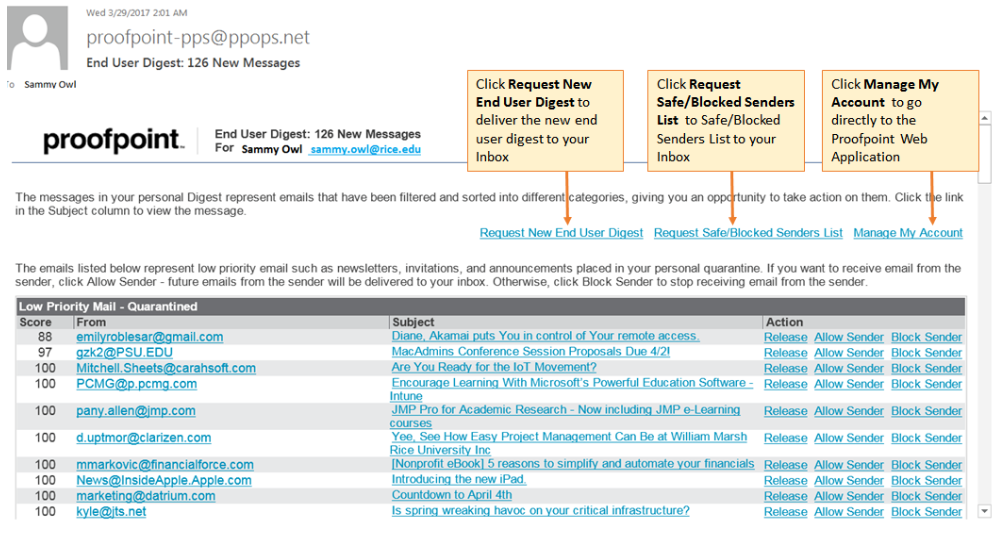
Like most spam filters, you have familiar options for how to handle the messages in your quarantine for ensuring that a sender is always blocked or allowed, or releasing the message this time without committing to always blocking or allowing the message.
Also of importance is the ability to "Request New End User Digest". If you're waiting for an important email that has not arrived-you can force Proofpoint to send a new digest email rather than wait for it to do so automatically after up to four hours.
Any messages in the quarantine that are not needed can be IGNORED. They will automatically purge after 30 days.
Interacting with ProofPoint Quarantine does require you to log into a ProofPoint account. When prompted for login, you can use your email address and your assigned password. You can also directly log into your ProofPoint Quarantine directly via https://us1.proofpointessentials.com/.